Introduction

The 2-week MVP challenge
Here’s the reality most solopreneurs face. You have a great idea, limited savings, and exactly zero employees. Traditional startup advice tells you to hire a dev team, raise funding, and spend six months building. But that path is closed to you. You need something different.
The good news? You can build and launch a functional MVP in two weeks. Not a prototype. Not a demo. A real product that real users can pay for. The tools exist right now, and they’ll cost you less than a nice dinner per month.
This guide walks through the essential toolkit for solopreneurs building MVPs in 2026. We’re talking hosting, design, development, and automation. Each tool selected for one reason: it lets you move fast without writing checks you can’t cash.
table of contents
Open table of contents
- 1. Hostinger: Affordable hosting that just works
- 2. Canva: Professional design without the designer
- 3. AI-powered development tools
- pricing-features
- 4. No-code alternatives for non-technical founders
- 5. Zapier: The glue that holds your stack together
- 6. The complete solopreneur stack: How it all works together
- integrated workflow
- cost breakdown
- MVP development Costs
- Start building your MVP this week
- Frequently Asked Questions
- Do I need coding skills to build an MVP as a solopreneur?
- What’s the minimum budget needed to build an MVP with these tools?
- Can I really build an MVP in two weeks using these tools?
- Should I use AI development tools or no-code platforms?
- What happens when my MVP outgrows these tools?
- Is it better to hire a developer instead of using these tools?
1. Hostinger: Affordable hosting that just works
Every MVP needs a home on the internet. Hostinger has become the go-to choice for solopreneurs who want reliable hosting without the enterprise price tag.
Why hosting matters for your MVP
Your hosting choice affects everything. Slow load times kill conversions. Downtime destroys trust. And complicated control panels waste hours you don’t have. Hostinger addresses all three problems.
Their custom hPanel control panel simplifies website management. You get one-click WordPress installation, free SSL certificates, and automatic backups without touching a config file. For non-technical founders, this matters. You should be focused on customers, not server settings.
Hostinger pricing breakdown
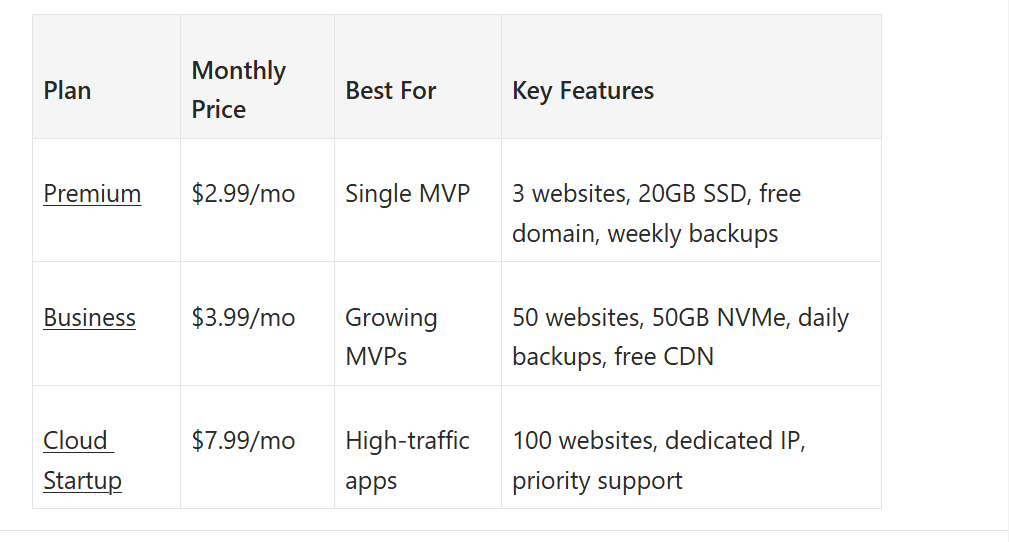
The Business plan hits the sweet spot for most solopreneurs. At $3.99 per month, you get NVMe storage (faster than standard SSD), daily backups, and the AI Agent for WordPress. The free domain for the first year saves you another $10-15.
Setup time: From signup to live in 30 minutes
Hostinger’s AI Website Builder can get you from zero to a landing page in under an hour. For WordPress users, the one-click installer handles the technical setup. Connect your domain, pick a template, and you’re live.
2. Canva: Professional design without the designer
You can’t ship an MVP that looks amateur. But hiring a designer costs thousands, and learning Photoshop takes months you don’t have. Canva bridges that gap.
The solopreneur design dilemma
Your MVP needs multiple design assets. Logo, landing page mockups, social media graphics, pitch deck slides. Creating these used to require either design skills or design budgets. Canva gives you neither requirement.
The platform offers 1.6 million free templates and 4.7 million photos, videos, and graphics. Drag and drop your way to professional-looking assets. The learning curve is measured in hours, not weeks.
Canva Pro features worth paying for
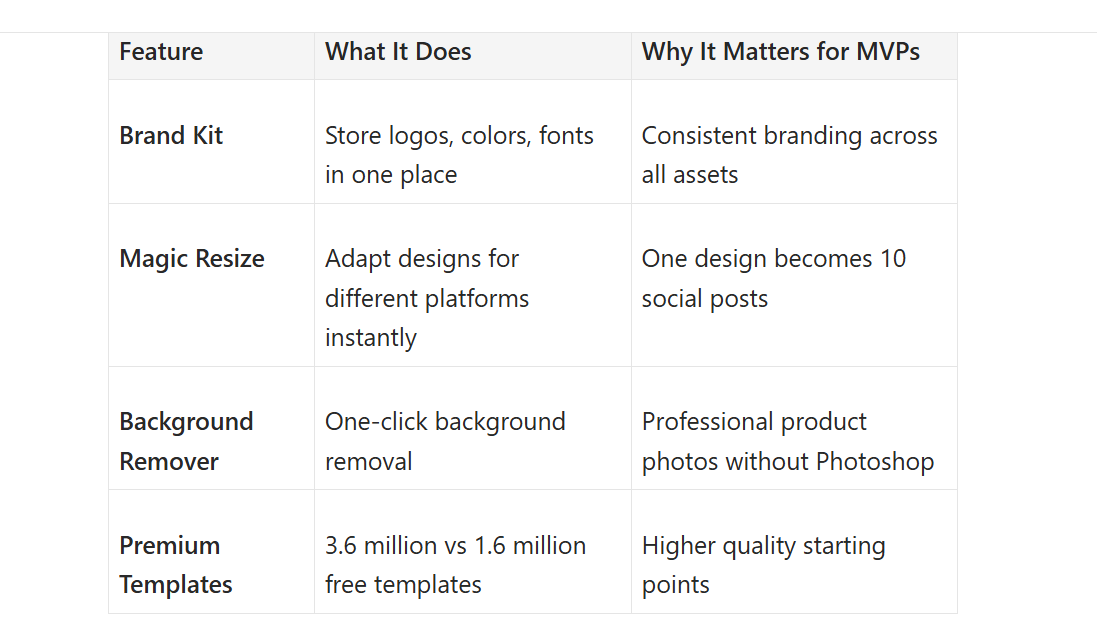
The free tier handles basic needs, but Canva Pro at $12.99 per month unlocks features that speed up MVP development:
canva’s brand kit interface
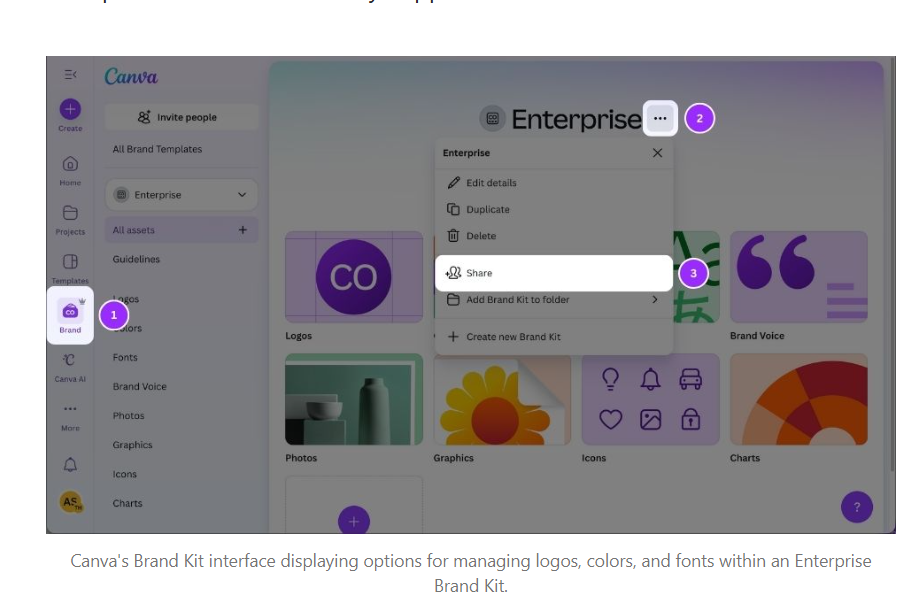
The Brand Kit alone justifies the cost. Set your colors, upload your logo, and every design stays on-brand automatically. For a solopreneur juggling multiple tasks, this consistency happens without extra effort.
3. AI-powered development tools
This is where the game has changed. You no longer need to choose between learning to code or hiring developers. AI development tools let you build functional applications through conversation, not code.
v0.dev: UI generation for technical founders
v0.dev is Vercel’s AI platform that generates production-ready React components from text prompts. Describe what you want, and it outputs clean, exportable code using React, TypeScript, Tailwind CSS, and shadcn/ui.
The pricing starts at $20 per month for the Premium plan. For that, you get higher generation limits and the ability to deploy directly to Vercel. The code belongs to you. Export it, modify it, host it wherever you want.
v0 works best if you have some technical background. You don’t need to write code from scratch, but understanding React basics helps you customize the output. Technical founders who want clean code without typing it all themselves find the sweet spot here.
Bolt.new: Full-stack apps from a single prompt
If v0 is for frontend components, Bolt.new aims for full applications. Built by StackBlitz, this tool generates complete full-stack apps from natural language prompts. Backend, frontend, database connections, all from a description.
pricing-features
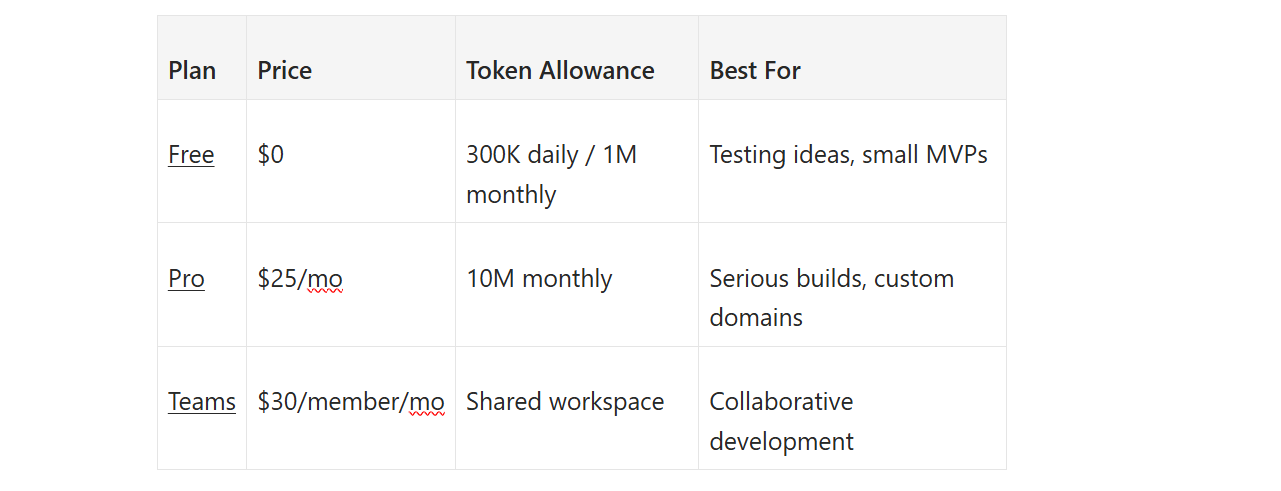
The free tier is surprisingly generous. One million tokens per month handles smaller MVPs entirely. Tokens measure AI usage (larger projects consume more). For many solopreneurs, the free plan covers launch and early validation.
What makes Bolt different is the browser-based environment. No local setup, no dependency hell. Everything runs in your browser and deploys with one click. For non-technical founders, this removes the biggest barrier to building.
Cursor.sh: AI pair programming for developers
If you already write code, Cursor.sh changes how you do it. Built on VS Code, Cursor adds AI that understands your entire codebase. Ask it to refactor a function, and it knows how that change affects the rest of your app.
The Pro plan at $20 per month suits most solopreneur developers. You get extended Agent limits, access to frontier AI models, and cloud agents that can work while you’re away.
Cursor shines when you need custom logic that no-code tools can’t handle. Complex authentication, unique business rules, performance optimization. The AI handles boilerplate, you focus on the parts that matter.
4. No-code alternatives for non-technical founders
AI tools still require some technical comfort. If that describes you, traditional no-code platforms remain excellent options.
Bubble: The most capable no-code web builder
Bubble lets you build complex web applications without writing code. We’re talking SaaS products, marketplaces, internal tools. The visual editor handles both frontend design and backend logic.
Pricing starts at $32 per month for the Starter plan. The trade-off is platform lock-in. You can’t export your code from Bubble. If you outgrow the platform, you rebuild elsewhere. For MVPs, this rarely matters. By the time you need to migrate, you’ve validated your idea and can afford the rebuild.
Webflow: Design-first websites
If your MVP is content-heavy or design-critical, Webflow delivers pixel-perfect control. It generates clean HTML and CSS while giving you visual editing. The result looks custom-coded without the custom coder.
Plans start at $14 per month for basic sites. Webflow excels at marketing sites, portfolios, and content platforms. It’s not designed for complex applications, but many MVPs don’t need complexity. They need to look credible and convert visitors.
Glide: Spreadsheet-to-app in minutes
Glide turns Google Sheets or Airtable bases into working mobile apps. Connect your spreadsheet, and Glide generates screens, navigation, and data binding automatically.
At $19 per month, Glide handles internal tools, client portals, and simple customer-facing apps. The limitation is scalability. As your data grows, you hit Glide’s row limits. But for validating an idea with a few hundred users, it works perfectly.
5. Zapier: The glue that holds your stack together
Your MVP will use multiple tools. A form on your landing page. A payment processor. An email service. Without automation, you’re manually copying data between them. Zapier fixes this.
Essential MVP automations
Here are the workflows every solopreneur MVP needs:
- Lead capture to CRM: New form submission → Add to email list → Send welcome sequence
- Payment processing: Successful payment → Create receipt → Send thank you email → Grant access
- Customer support: Support ticket → Notify Slack → Add to tracking spreadsheet → Auto-respond
These sound simple, but doing them manually wastes hours weekly. Zapier handles them automatically, 24/7, while you focus on building.
Zapier pricing that scales with you
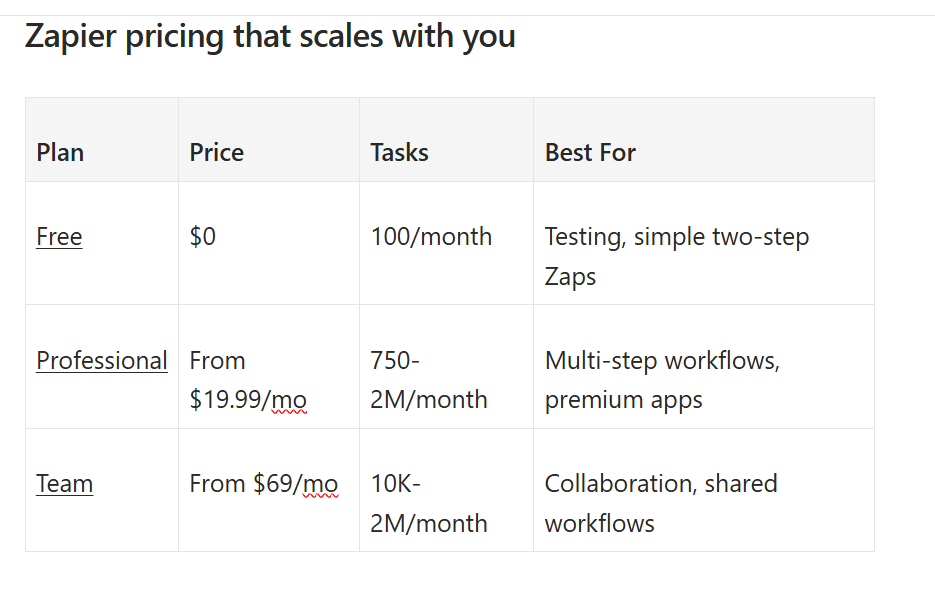
The free tier covers basic needs. One hundred tasks per month handles a small MVP’s automation. As you grow, the Professional plan at $19.99 unlocks multi-step Zaps and premium app integrations.
6. The complete solopreneur stack: How it all works together
Tools are only useful if they connect. Here’s how this stack flows together for a typical MVP launch.
Data flow diagram
A visitor arrives at your Hostinger-hosted landing page. They fill out a Canva-designed lead capture form. Zapier triggers, adding them to your email list and sending a personalized welcome message. If they purchase, another Zapier workflow processes the payment, delivers the product, and adds them to your customer database.
integrated workflow
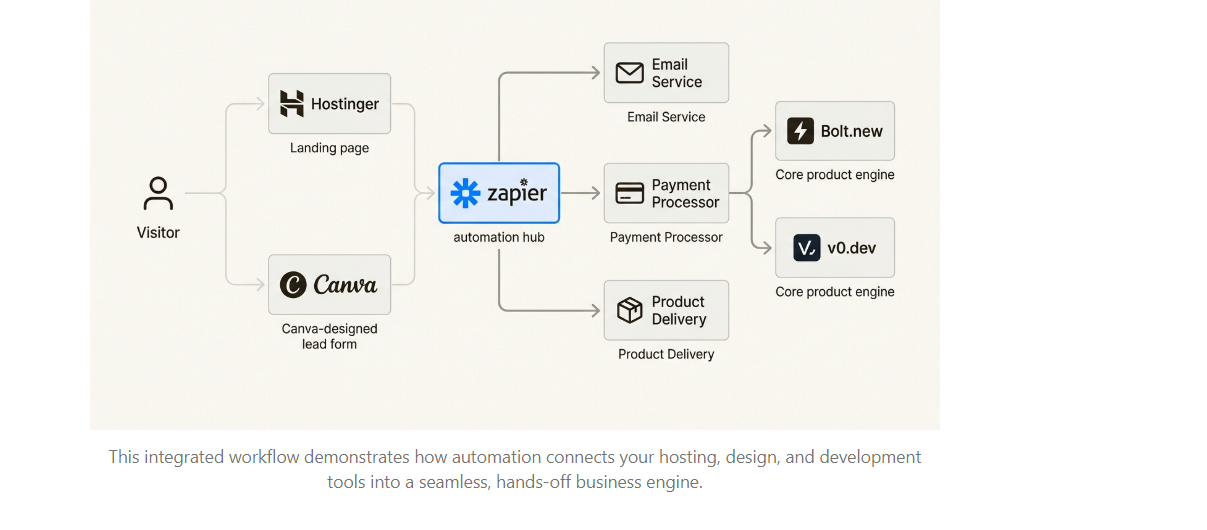
Behind the scenes, Bolt.new or v0.dev powers your actual product. Canva handles all visual assets. Everything talks to everything else through Zapier.
cost breakdown
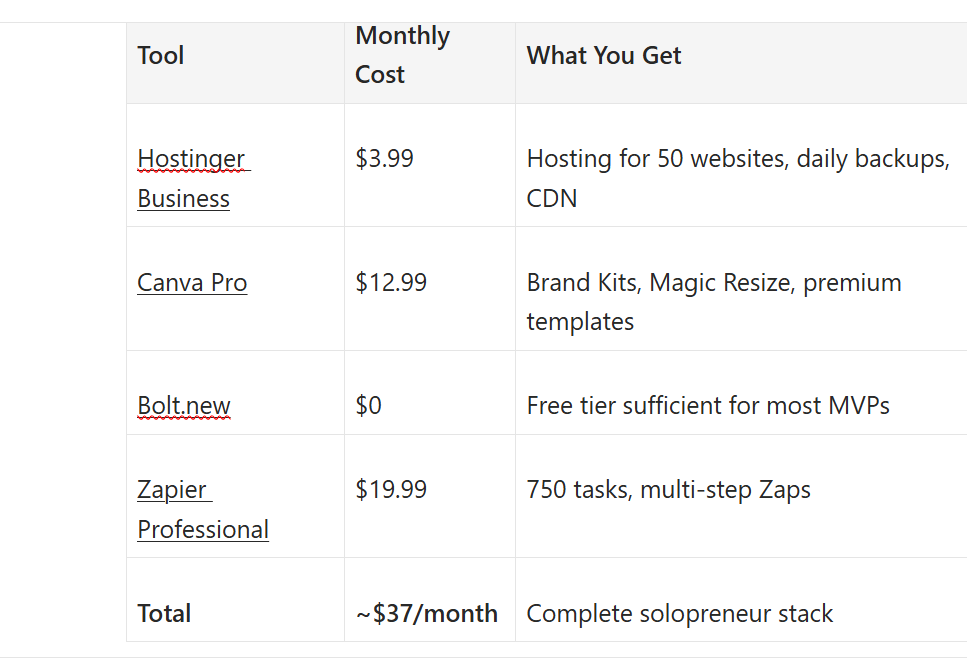
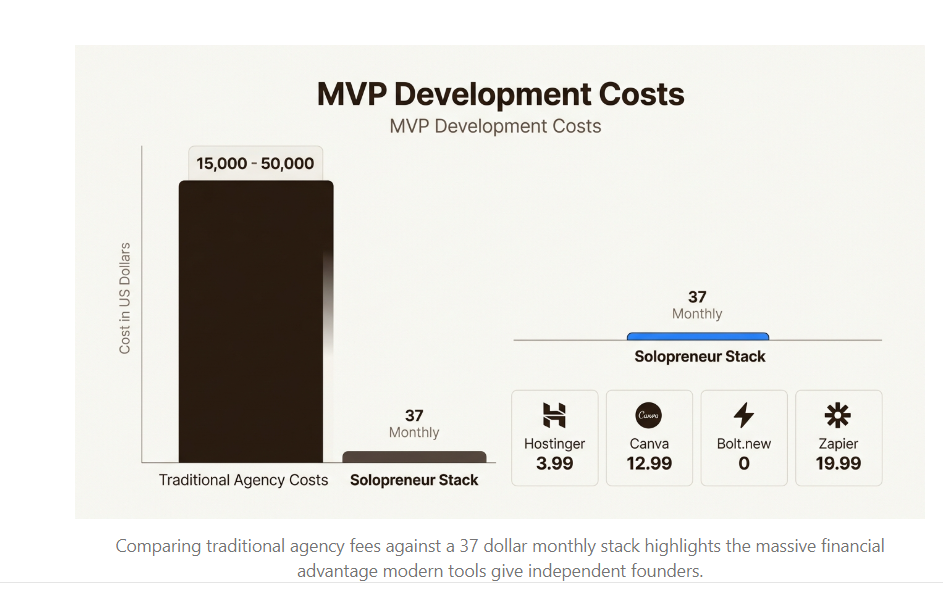
Under $40 per month. That’s less than most people spend on coffee. For that price, you get enterprise-grade infrastructure that would have cost thousands just five years ago.
MVP development Costs
Start building your MVP this week
You don’t need a team. You don’t need funding. You don’t need six months. The tools exist, they’re affordable, and they’re waiting.
Here’s your action plan:
- Day 1: Sign up for Hostinger, claim your free domain, install WordPress or launch a landing page
- Day 2: Set up Canva, create your Brand Kit, design your logo and social assets
- Day 3-5: Build your actual product in Bolt.new, v0.dev, or your no-code platform of choice
- Day 6-7: Connect everything with Zapier, test your workflows, launch
Two weeks from today, you could have paying customers. Not mockups. Not pitch decks. Real users giving you real feedback. The only question is whether you’ll start.
Frequently Asked Questions
Do I need coding skills to build an MVP as a solopreneur?
Not anymore. Tools like Bolt.new and Bubble let you build functional applications without writing code. If you can describe what you want, these tools can build it. Some technical knowledge helps with customization, but the barrier has never been lower.
What’s the minimum budget needed to build an MVP with these tools?
You can launch for under $5 per month using free tiers. Hostinger Premium at $2.99 plus Canva Free, Bolt.new Free, and Zapier Free covers the basics. As you grow, scaling to around $37 per month unlocks professional features across the stack.
Can I really build an MVP in two weeks using these tools?
Yes, if you scope it correctly. Focus on one core feature that solves one specific problem. Don’t build a full platform. Build the minimum thing that delivers value. The tools in this guide compress what used to take months into days.
Should I use AI development tools or no-code platforms?
It depends on your technical comfort and MVP complexity. AI tools like v0.dev and Cursor give you exportable code and more flexibility, but require some technical knowledge. No-code platforms like Bubble and Webflow are more constrained but easier for complete beginners.
What happens when my MVP outgrows these tools?
That’s a good problem to have. Most tools let you export data or code. Hostinger scales to dedicated servers. You can hire developers to rebuild specific components. By the time you outgrow the stack, you’ll have revenue to fund the transition.
Is it better to hire a developer instead of using these tools?
Developers cost $5,000 to $50,000 for MVP builds. These tools cost under $40 per month. Unless your MVP requires specialized technology that no tool offers, start with the affordable option. Validate your idea first. Hire developers once you have paying customers.